Saturday, August 17, 2024

Branching strategies and repository management practices

In Salesforce development, particularly when working with version control systems (VCS) like Git, it's crucial to have effective branching strategies and repository management practices. These strategies help manage code changes, collaborate with team members, and maintain a stable codebase. Here's an overview of commonly used branching strategies and repository practices for Salesforce development:

Branching Strategies

  1. Git Flow

    • Overview: A popular branching model that defines a strict workflow for managing branches and releases.

    • Branches:

      • main (or master): The production branch containing stable code.
      • develop: The integration branch for features and bug fixes that are ready for the next release.
      • feature/: Branches off from develop for new features. Merged back into develop when complete.
      • bugfix/: Branches off from develop for bug fixes. Merged back into develop when resolved.
      • release/: Branches off from develop for preparing a release. Contains final bug fixes and tweaks. Merged into both main and develop.
      • hotfix/: Branches off from main for urgent fixes in production. Merged back into both main and develop.
    • Use Case: Suitable for teams that need a structured workflow with clear stages for development, testing, and production.

  2. GitHub Flow

    • Overview: A simplified workflow focusing on continuous delivery and rapid deployment.

    • Branches:

      • main (or master): The production branch with deployable code.
      • Feature branches: Created off main for each new feature or bug fix. Merged back into main via pull requests (PRs) once code is reviewed and approved.
    • Use Case: Ideal for teams that deploy code frequently and need a streamlined approach to manage changes.

  3. GitLab Flow

    • Overview: Combines aspects of Git Flow and GitHub Flow, with additional focus on environment-specific branches.

    • Branches:

      • main (or master): The production branch.
      • pre-production: A staging branch for testing before production.
      • Feature branches: Used for developing new features or fixes.
      • environment branches: Branches for different deployment environments (e.g., staging, qa).
    • Use Case: Suitable for teams with multiple environments and a need for more complex workflows.

  4. Trunk-Based Development

    • Overview: A development model where all developers work on a single branch (the trunk) and integrate changes frequently.

    • Branches:

      • trunk: The primary branch where all changes are integrated. Feature flags can be used to enable or disable incomplete features.
    • Use Case: Best for teams practicing continuous integration and deployment with frequent releases.

Repository Management

  1. Monorepo vs. Polyrepo

    • Monorepo: A single repository containing multiple projects or components. Benefits include easier dependency management and consistent tooling.
      • Example: A single repository that includes Salesforce code (Apex, LWC), integration scripts, and configuration files.
    • Polyrepo: Multiple repositories, each containing a single project or component. Allows for more granular control and independent versioning.
      • Example: Separate repositories for Salesforce code, third-party integrations, and front-end applications.
  2. Repository Structure

    • Folder Organization: Structure the repository with clear folders for different components. For Salesforce projects, you might have:

      • src/: Source code (Apex classes, Lightning Web Components, etc.).
      • scripts/: Deployment and automation scripts.
      • config/: Configuration files and settings.
      • docs/: Documentation and guidelines.
    • Versioning: Use tags or branches to mark different versions or releases of your code.

  3. Deployment Pipelines

    • CI/CD Integration: Integrate with Continuous Integration (CI) and Continuous Deployment (CD) tools like GitHub Actions, GitLab CI/CD, or Jenkins. Automate testing, building, and deploying Salesforce code to different environments.
      • Example: Use a CI/CD pipeline to deploy code from feature branches to a staging environment for testing, and then merge to main for production deployment.
  4. Code Reviews

    • Pull Requests (PRs): Use pull requests to review code before merging changes into main branches. This ensures code quality and collaboration.
    • Code Review Practices: Establish guidelines for code reviews, such as checking for code standards, security issues, and ensuring proper documentation.
  5. Branch Naming Conventions

    • Feature Branches: feature/short-description
    • Bug Fixes: bugfix/short-description
    • Hotfixes: hotfix/short-description
    • Releases: release/vX.Y.Z
  6. Documentation

    • ReadMe Files: Provide clear instructions on how to set up, build, and deploy the project.
    • Contribution Guidelines: Outline how to contribute to the project, including branching strategies, code standards, and review processes.

Summary

Effective branching strategies and repository management practices are key to maintaining a clean and manageable codebase in Salesforce development. By choosing an appropriate branching model and structuring your repository well, you can enhance collaboration, streamline deployments, and ensure the quality of your Salesforce applications.

Apex Enterprise Patterns

 Apex Enterprise Patterns are a set of design patterns and best practices for structuring Salesforce applications using Apex. These patterns help create scalable, maintainable, and modular codebases by separating concerns and encapsulating different aspects of your application. Key components include using interfaces, service layers, and domain layers. Here's an overview of how these patterns work, with a focus on interfaces:

1. Domain Layer

  • Purpose: Encapsulates the business logic related to a specific Salesforce object (e.g., Account, Opportunity). The Domain Layer operates on the domain model, which represents the data and behavior of the business entities.
  • Example:

    public class AccountDomain { public static void beforeUpdate(List<Account> accounts) { for (Account acc : accounts) { // Business logic before Account update } } }
  • Usage: Called from triggers to execute business logic, for example, AccountDomain.beforeUpdate(Trigger.new);.

2. Service Layer

  • Purpose: Encapsulates complex business processes and coordinates the interaction between different parts of the system. The service layer is where the application’s business logic resides.
  • Example:

    public class AccountService { public void updateAccounts(List<Account> accounts) { // Invoke Domain logic or other services AccountDomain.beforeUpdate(accounts); update accounts; } }
  • Usage: Use the service layer methods in controllers or other services to carry out business processes.

3. Selector Layer

  • Purpose: Encapsulates SOQL queries and ensures that querying logic is centralized. It helps in enforcing consistent query practices, such as limiting fields and records returned.
  • Example:

    public class AccountSelector { public static List<Account> selectByStatus(String status) { return [SELECT Id, Name FROM Account WHERE Status__c = :status]; } }
  • Usage: Use selectors to retrieve records rather than writing SOQL directly in other layers, e.g., AccountSelector.selectByStatus('Active');.

4. Unit of Work

  • Purpose: Manages the changes to be made to the database and coordinates the final commit of these changes. This pattern helps in keeping track of changes across multiple objects and ensuring they are committed in a controlled manner.
  • Example:

    public class UnitOfWork { private List<SObject> newRecords = new List<SObject>(); private List<SObject> updatedRecords = new List<SObject>(); public void registerNew(SObject record) { newRecords.add(record); } public void registerDirty(SObject record) { updatedRecords.add(record); } public void commit() { insert newRecords; update updatedRecords; } }
  • Usage: Track changes using registerNew() or registerDirty(), and commit using commit().

5. Application Layer

  • Purpose: Acts as the entry point for all your business logic and service layers. It’s the top layer that orchestrates interactions between different services and processes.
  • Example:

    public class Application { private static final AccountService accountService = new AccountService(); public static AccountService getAccountService() { return accountService; } }
  • Usage: Access services via the Application layer, e.g., Application.getAccountService().updateAccounts(accounts);.

6. Facade Pattern

  • Purpose: Provides a simplified interface to a complex subsystem or set of classes. It hides the complexities and allows for easier interaction with the system.
  • Example:

    public class AccountFacade { public void updateAccountStatus(Id accountId, String status) { Account acc = [SELECT Id, Status__c FROM Account WHERE Id = :accountId LIMIT 1]; acc.Status__c = status; update acc; } }
  • Usage: Use the facade to carry out complex operations with simple method calls.

7. Interfaces

  • Purpose: Interfaces define contracts that classes must adhere to, allowing for loose coupling and flexibility. They are particularly useful in patterns like the Strategy, Factory, and Dependency Injection.
  • Example:

    public interface IAccountProcessor { void process(List<Account> accounts); } public class ActiveAccountProcessor implements IAccountProcessor { public void process(List<Account> accounts) { // Logic for processing active accounts } } public class InactiveAccountProcessor implements IAccountProcessor { public void process(List<Account> accounts) { // Logic for processing inactive accounts } }
  • Usage: Use interfaces to create different implementations that can be swapped out, e.g., IAccountProcessor processor = new ActiveAccountProcessor(); processor.process(accounts);.

8. Trigger Handler Pattern

  • Purpose: Separates trigger logic from the trigger itself, improving maintainability and testability. This pattern often leverages the Domain Layer for business logic.
  • Example:

    public class AccountTriggerHandler extends TriggerHandler { public override void beforeUpdate() { AccountDomain.beforeUpdate((List<Account>) Trigger.new); } }
  • Usage: Associate the handler with the trigger, e.g., trigger AccountTrigger on Account (before update) { new AccountTriggerHandler().run(); }.

9. Dependency Injection

  • Purpose: Promotes loose coupling by allowing dependencies to be injected rather than hardcoded within classes. This pattern enhances testability and flexibility.
  • Example:

    public class AccountController { private IAccountProcessor accountProcessor; public AccountController(IAccountProcessor accountProcessor) { this.accountProcessor = accountProcessor; } public void processAccounts(List<Account> accounts) { accountProcessor.process(accounts); } }
  • Usage: Inject dependencies via constructors or setters, e.g., AccountController controller = new AccountController(new ActiveAccountProcessor()); controller.processAccounts(accounts);.

Summary

Apex Enterprise Patterns promote organized, modular code with clear separation of concerns, making applications easier to maintain, test, and extend. Using interfaces is key to achieving flexibility and loose coupling between components, ensuring that your Salesforce solutions are robust and adaptable to change.

Mulesoft best practices

 Implementing best practices in MuleSoft is crucial for building scalable, maintainable, and efficient integrations. These practices help ensure that your MuleSoft applications are robust, perform well, and are easier to manage and update over time. Below are some key MuleSoft best practices:

1. API-Led Connectivity

  • Adopt API-Led Connectivity: Use the API-led connectivity approach to design your architecture with System APIs, Process APIs, and Experience APIs. This layered approach promotes reuse, simplifies integration, and supports agile development.
  • Decouple APIs: Keep your APIs independent of each other to allow them to evolve without breaking dependencies.

2. Modular Design

  • Break Down Complex Integrations: Divide large, complex integration flows into smaller, modular flows or sub-flows. This makes your integration easier to manage, debug, and test.
  • Reusable Components: Create reusable components, such as DataWeave scripts, connectors, and error-handling mechanisms, to promote consistency and reduce duplication.

3. Error Handling

  • Centralized Error Handling: Implement global error handling strategies using On Error Propagate and On Error Continue scopes. Use a dedicated flow or sub-flow to handle errors consistently across the application.
  • Logging: Log errors with enough context to identify the issue quickly. Use consistent logging formats and levels (e.g., DEBUG, INFO, WARN, ERROR).

4. DataWeave Best Practices

  • Modular DataWeave Code: Keep your DataWeave transformations modular by separating logic into functions and reusable modules. This enhances readability and maintainability.
  • Use Variables Wisely: Define variables for repeated expressions or complex transformations to avoid redundancy and improve performance.
  • Optimize DataWeave Performance: Be mindful of the performance impact of your transformations, especially in large datasets. Use map and filter functions efficiently, and avoid unnecessary loops or deep nested structures.

5. Security

  • Secure APIs with Policies: Use MuleSoft API Manager to apply security policies like OAuth 2.0, IP whitelisting, and client ID enforcement. Always ensure that sensitive data is encrypted in transit and at rest.
  • Validate Inputs: Always validate incoming data to prevent injection attacks and other security vulnerabilities.
  • Use Secure Properties: Store sensitive information, such as credentials, in secure properties files and use MuleSoft's secure property placeholders to reference them in your application.

6. Performance Optimization

  • Use Caching: Implement caching strategies where appropriate to reduce load on backend systems and improve response times. MuleSoft provides caching scopes and external cache stores for this purpose.
  • Optimize Resource Use: Use connection pooling and thread management efficiently to optimize the use of system resources. Configure connectors for optimal performance, considering the expected load.
  • Batch Processing: For large data loads, use batch processing to handle data in chunks, reducing memory consumption and improving performance.

7. Scalability

  • Design for Scalability: Ensure your Mule applications can scale horizontally (adding more instances) or vertically (adding more resources to existing instances) based on load.
  • Load Balancing: Use load balancing to distribute traffic evenly across multiple Mule runtimes or instances to avoid bottlenecks.

8. Version Control and CI/CD

  • Version Control: Use a version control system (e.g., Git) to manage your Mule projects. Commit changes frequently with meaningful messages, and use branches to manage different features or releases.
  • Continuous Integration/Continuous Deployment (CI/CD): Implement CI/CD pipelines to automate the build, test, and deployment process. This ensures that your Mule applications are tested and deployed consistently and quickly.

9. Testing

  • Automated Unit Testing: Write automated tests for your Mule flows using MUnit. Cover different scenarios, including edge cases and error handling, to ensure your application behaves as expected.
  • Performance Testing: Conduct performance testing to identify bottlenecks and ensure your Mule application can handle the expected load. Tools like JMeter or LoadRunner can be integrated for this purpose.

10. Documentation and Comments

  • Document APIs: Use Anypoint Platform’s API Designer to create clear, concise documentation for your APIs. Include details about endpoints, request/response formats, error codes, and usage examples.
  • Code Comments: Add meaningful comments to your Mule code to explain the purpose of complex logic or important decisions. However, avoid excessive comments that might clutter the code.

11. Environment Management

  • Use Multiple Environments: Develop in a lower environment (development, testing, staging) before deploying to production. Use separate configuration files for each environment to manage environment-specific settings.
  • Property Management: Use properties files to manage environment-specific variables like endpoint URLs, database connections, and credentials. This practice enhances flexibility and security.

12. Monitoring and Logging

  • Enable Monitoring: Use Anypoint Monitoring to track the performance of your Mule applications in real-time. Set up alerts to detect and respond to issues promptly.
  • Centralized Logging: Implement centralized logging to aggregate logs from different Mule applications. Tools like Splunk, ELK (Elasticsearch, Logstash, Kibana), or CloudHub’s logging features can be useful.

13. API Governance

  • Enforce Standards: Define and enforce API standards across your organization, including naming conventions, security policies, and documentation requirements.
  • Versioning: Implement API versioning to manage changes without breaking existing consumers. Follow a clear versioning strategy (e.g., Semantic Versioning) to communicate changes effectively.

14. Change Management

  • Manage Dependencies: Track and manage dependencies between different Mule applications and APIs. Ensure that changes in one component do not inadvertently affect others.
  • Release Management: Plan and coordinate releases carefully, especially when multiple teams are working on related Mule applications. Use a release management process to minimize risks.

Conclusion

Following these best practices in MuleSoft development ensures that your integration projects are well-architected, secure, and easy to maintain. By focusing on modularity, security, performance, and proper governance, you can build robust MuleSoft solutions that meet your organization’s needs and can evolve over time with minimal disruption.

Separation of concerns (SoC) in Mulesoft

 Separation of concerns (SoC) is a fundamental design principle in software architecture that involves dividing a system into distinct sections, each addressing a specific aspect of the system's functionality. In MuleSoft, this principle is crucial for building scalable, maintainable, and modular integration solutions. SoC helps developers manage complexity by ensuring that each part of the system has a clear, well-defined responsibility.

Key Aspects of Separation of Concerns in MuleSoft

1. Layered API-Led Connectivity

MuleSoft promotes the use of API-led connectivity, which inherently supports the separation of concerns by organizing APIs into three distinct layers: System APIs, Process APIs, and Experience APIs. Each layer has its own responsibility, allowing for clear separation of functionality and concerns.

  • System APIs: These APIs are responsible for interacting with underlying systems (e.g., CRM, ERP, databases) and exposing their data and services. They encapsulate the complexity of the underlying systems and provide a consistent interface for data access.

    Concern: System integration and data access.

  • Process APIs: These APIs orchestrate and manage business logic by combining data from multiple System APIs. They handle the processes that span multiple systems and are responsible for the core business logic.

    Concern: Business process orchestration and data transformation.

  • Experience APIs: These APIs are tailored to the needs of specific user experiences, such as mobile apps, web applications, or partner portals. They consume data from Process APIs and present it in a format suitable for the end-users.

    Concern: User interface and experience-specific data presentation.

2. Modular Integration Flows

In MuleSoft, integration flows can be divided into modules or sub-flows, each responsible for a specific task or concern. This modularity allows developers to encapsulate different concerns within separate flows, making the overall integration easier to manage and modify.

  • Example: A Mule application could have separate flows for data validation, data transformation, and routing. Each flow handles a distinct concern, and changes to one flow do not impact the others.

    Concern: Encapsulation of specific tasks such as validation, transformation, and routing.

3. Reusable Components

MuleSoft encourages the creation of reusable components, such as DataWeave scripts, connectors, and custom components. These components encapsulate specific logic and can be reused across multiple integration flows, ensuring that concerns like data transformation or error handling are handled consistently.

  • Example: A DataWeave script for transforming customer data can be reused across different APIs, ensuring that the transformation logic is consistent and centralized.

    Concern: Consistency and reusability of specific functionalities.

4. Error Handling and Logging

Error handling and logging are critical concerns in any integration application. In MuleSoft, these concerns can be separated into dedicated flows or components, ensuring that error handling logic is consistent and can be applied across different parts of the integration.

  • Example: A global error handling flow can be configured to catch and process errors from multiple integration flows, logging them to a central system and sending notifications as needed.

    Concern: Centralized error handling and logging.

5. Security Management

Security is another concern that can be separated in MuleSoft. Security policies, such as OAuth, JWT, or IP whitelisting, can be applied at the API level using API Manager, ensuring that security is managed consistently across all APIs without embedding security logic directly into the integration flows.

  • Example: Applying an OAuth policy to a System API ensures that only authorized users can access the underlying system, regardless of the application consuming the API.

    Concern: Centralized and consistent application of security policies.

6. Data Transformation

Data transformation is often a significant concern in integrations, as different systems may require data in different formats. In MuleSoft, DataWeave allows developers to separate transformation logic from the rest of the integration flow, making it easier to manage and update.

  • Example: A dedicated DataWeave transformation component can handle the conversion of data from one format to another, which can be reused across multiple APIs.

    Concern: Centralized data transformation logic.

Benefits of Separation of Concerns in MuleSoft

  • Improved Maintainability: By separating different concerns into distinct layers, flows, or components, changes to one part of the system can be made without affecting others, making the system easier to maintain.

  • Enhanced Reusability: Reusable components, such as DataWeave scripts or security policies, can be applied across different parts of the integration architecture, reducing duplication and enhancing consistency.

  • Scalability: With clear separation, the integration architecture can scale more effectively. For example, new System APIs can be added without affecting existing Process or Experience APIs.

  • Easier Debugging and Testing: When concerns are separated, it's easier to isolate and debug issues. Testing can also be more focused, as each module or flow can be tested independently.

  • Flexibility: Separation of concerns allows different teams to work on different aspects of the integration in parallel, increasing development speed and flexibility.

Conclusion

Separation of concerns is a critical principle in MuleSoft architecture that helps manage complexity, improve maintainability, and ensure that integrations are robust and scalable. By organizing integration solutions into distinct layers, flows, and reusable components, MuleSoft enables developers to build modular, maintainable, and scalable systems that can adapt to changing business needs.

MuleSoft enterprise integration patterns

 MuleSoft, a leader in the integration space, provides a robust platform for connecting applications, data, and devices across on-premises and cloud environments. As enterprises increasingly adopt MuleSoft to build scalable and efficient integrations, certain patterns have emerged that can guide architects and developers in designing solutions that are both robust and maintainable. Below are some key MuleSoft enterprise integration patterns:

1. System API Pattern

Description: This pattern involves creating System APIs that provide a consistent interface to core systems, such as ERP, CRM, and databases. These APIs abstract the underlying systems' complexity and standardize access, allowing for easier integration across various systems.

Use Case: When integrating with multiple back-end systems that may have different protocols, data formats, or access mechanisms.

Benefits:

  • Simplifies integrations by providing a standardized API interface.
  • Enhances reusability and reduces the need for direct system integration.
  • Enables easier maintenance by decoupling systems from consumer applications.

2. Process API Pattern

Description: Process APIs are designed to handle business processes and orchestrate multiple System APIs. They combine data and logic from various sources and expose them as a single service to be consumed by experience layers or other applications.

Use Case: When needing to coordinate complex business processes that involve multiple steps across different systems.

Benefits:

  • Centralizes business logic, making it easier to maintain and update.
  • Reduces duplication of logic across multiple consumer applications.
  • Supports orchestration and transformation of data from various sources.

3. Experience API Pattern

Description: Experience APIs are tailored to specific user interfaces or channels, such as mobile apps, web applications, or partner portals. They consume data from Process APIs and System APIs, transforming it into a format that suits the needs of the specific user experience.

Use Case: When different consumer applications require data in different formats or when supporting multiple channels with tailored experiences.

Benefits:

  • Provides flexibility in adapting data to different front-end requirements.
  • Allows for independent evolution of user interfaces without impacting back-end systems.
  • Improves performance by delivering optimized data for specific use cases.

4. Event-Driven Architecture (EDA) Pattern

Description: EDA is a design pattern where integration is driven by events. Applications or systems publish events to a message broker or event bus, and other systems can subscribe to these events to react accordingly.

Use Case: For scenarios requiring real-time data synchronization or where systems need to react to changes in state or data.

Benefits:

  • Enables real-time processing and low-latency integrations.
  • Decouples event producers from consumers, leading to a more scalable architecture.
  • Supports asynchronous communication, which is useful for long-running processes.

5. API-Led Connectivity

Description: API-led connectivity is a MuleSoft-specific methodology that organizes integration into three distinct layers: System APIs, Process APIs, and Experience APIs. Each layer serves a specific purpose in the overall architecture.

Use Case: When implementing a large-scale integration solution that requires clear separation of concerns and modularity.

Benefits:

  • Promotes reuse of APIs across the enterprise.
  • Enhances modularity, making the integration architecture easier to manage and scale.
  • Facilitates agile development by allowing teams to work on different layers independently.

6. Data Aggregation Pattern

Description: This pattern involves combining data from multiple sources into a single unified view. It is often used in conjunction with Process APIs to aggregate data from various System APIs before passing it to Experience APIs.

Use Case: When needing to present a consolidated view of data from multiple systems, such as a 360-degree view of a customer.

Benefits:

  • Reduces the complexity of consumer applications by providing pre-aggregated data.
  • Improves performance by reducing the number of calls needed to fetch data.
  • Simplifies data retrieval and transformation logic.

7. Data Synchronization Pattern

Description: The data synchronization pattern ensures that data across multiple systems remains consistent and up-to-date. This can be implemented using batch processing, event-driven synchronization, or real-time replication.

Use Case: When multiple systems need to be kept in sync, such as ensuring that a CRM system and an ERP system have the same customer data.

Benefits:

  • Maintains data consistency across disparate systems.
  • Supports various synchronization strategies (real-time, batch, etc.) based on business needs.
  • Reduces the risk of data inconsistency, leading to better decision-making.

8. Message Routing Pattern

Description: Message routing patterns control the flow of messages between components in an integration. Common routing patterns include content-based routing, where messages are directed to different destinations based on their content, and dynamic routing, where the destination is determined at runtime.

Use Case: When integrating with multiple systems where messages need to be delivered to different endpoints based on their content or metadata.

Benefits:

  • Increases flexibility in handling different types of messages within a single integration flow.
  • Supports complex routing logic, enabling dynamic and adaptable integrations.
  • Improves maintainability by centralizing routing logic.

9. Scatter-Gather Pattern

Description: The scatter-gather pattern involves sending a message to multiple endpoints simultaneously and then aggregating the responses into a single message. This pattern is useful for parallel processing or when aggregating data from multiple sources.

Use Case: When needing to query multiple systems in parallel and aggregate the results, such as retrieving pricing information from different vendors.

Benefits:

  • Improves performance by enabling parallel processing.
  • Aggregates data from multiple sources into a single response.
  • Reduces the time needed to gather data from various systems.

10. Circuit Breaker Pattern

Description: The circuit breaker pattern is used to handle faults gracefully by stopping the flow of requests to a service that is experiencing failures. If a service fails too many times, the circuit breaker trips and subsequent calls fail immediately, allowing the service to recover.

Use Case: In scenarios where calling a failing service repeatedly could cause further degradation or impact other systems.

Benefits:

  • Enhances system resilience by preventing cascading failures.
  • Provides a fallback mechanism during service outages.
  • Improves system stability and fault tolerance.

Conclusion

Implementing these enterprise patterns using MuleSoft can lead to more scalable, maintainable, and efficient integration architectures. By adhering to these patterns, organizations can better manage complexity, improve system reliability, and ensure that their integration solutions are aligned with business goals. Understanding and applying these patterns is key to mastering MuleSoft and delivering successful integration projects.

Understanding Salesforce AI Models: A Deep Dive

 In the fast-evolving landscape of business technology, Salesforce stands out as a leader, constantly innovating to meet the needs of modern enterprises. One of the most significant areas where Salesforce is making a substantial impact is through the integration of AI models into its ecosystem. These AI models are designed to supercharge productivity, streamline operations, and enhance customer experiences. In this blog post, we’ll explore what Salesforce AI models are, how they work, and why they matter for businesses today.

What Are Salesforce AI Models?

Salesforce AI models are sophisticated machine learning algorithms embedded within the Salesforce platform. These models are designed to analyze vast amounts of data, identify patterns, and make predictions that help businesses make more informed decisions. They are the backbone of Salesforce’s AI-powered features, like Einstein, which provides insights and automations across various Salesforce products.

Key Components of Salesforce AI

1. Salesforce Einstein

Salesforce Einstein is the AI layer of Salesforce, integrated across all of its cloud products. It includes a range of AI models that support different functions:

  • Einstein Analytics: This tool uses AI to analyze data and provide actionable insights, helping businesses understand trends and forecast future outcomes.
  • Einstein Discovery: It automates data analysis and identifies key drivers of business metrics, suggesting improvements.
  • Einstein Vision and Language: These models help in understanding and categorizing images and text, enabling automated image recognition and sentiment analysis.

2. Natural Language Processing (NLP)

Salesforce AI models use NLP to understand and process human language. This is particularly useful in features like chatbots and automated customer service, where the system needs to interpret customer queries and respond appropriately.

3. Predictive Analytics

These models analyze historical data to make predictions about future trends. For example, Salesforce’s predictive lead scoring can help sales teams prioritize their efforts by identifying which leads are most likely to convert.

How Do Salesforce AI Models Work?

Salesforce AI models work by leveraging large datasets collected from various sources, including customer interactions, sales data, and marketing campaigns. These datasets are processed using machine learning algorithms that learn from the data and improve over time. Here’s a simplified breakdown of how these models function:

  1. Data Collection: Salesforce collects data from all interactions and touchpoints across its platforms.

  2. Data Processing: The collected data is cleaned and processed to make it suitable for analysis. This includes removing duplicates, handling missing values, and normalizing data.

  3. Model Training: AI models are trained using historical data. For instance, a predictive model might be trained on past sales data to forecast future sales.

  4. Deployment and Iteration: Once trained, the model is deployed within the Salesforce environment, where it begins making predictions and providing insights. Over time, as more data is collected, the model is retrained and refined to improve its accuracy.

Benefits of Salesforce AI Models for Businesses

1. Enhanced Decision-Making

By providing actionable insights and predictions, Salesforce AI models help businesses make data-driven decisions. This can lead to more effective strategies and improved outcomes.

2. Increased Efficiency

Automation powered by AI models reduces the need for manual intervention in various processes, such as lead scoring, customer service, and data analysis. This frees up time for employees to focus on more strategic tasks.

3. Personalized Customer Experiences

Salesforce AI models enable businesses to deliver personalized experiences to customers by understanding their preferences and behaviors. This can lead to higher customer satisfaction and loyalty.

4. Scalability

As businesses grow, so does their data. Salesforce AI models are built to handle large volumes of data, ensuring that insights remain relevant and actionable even as the business scales.

Real-World Applications of Salesforce AI Models

  • Sales Forecasting: Businesses use AI models to predict sales trends, helping them to allocate resources more effectively.
  • Customer Service Automation: AI-powered chatbots and virtual assistants handle routine customer queries, allowing human agents to focus on more complex issues.
  • Marketing Automation: AI models optimize marketing campaigns by predicting which messages will resonate most with different customer segments.

The Future of Salesforce AI

Salesforce continues to innovate its AI offerings, with ongoing advancements in areas like deep learning, conversational AI, and real-time data processing. As AI technology evolves, we can expect even more powerful tools that will further enhance the capabilities of the Salesforce platform.

Conclusion

Salesforce AI models represent a significant advancement in the way businesses can leverage technology to drive growth and efficiency. By integrating AI into their operations, companies can unlock new levels of insight, automation, and customer engagement. As the technology continues to evolve, those who embrace it early will be well-positioned to lead in their respective industries.

Whether you’re a small business looking to improve customer relations or a large enterprise aiming to optimize your operations, Salesforce AI models offer tools that can help you achieve your goals. Now is the time to explore how these models can benefit your business and set you on the path to success in an increasingly data-driven world.

Saturday, May 30, 2020

Some important capabilities of Salesforce Lightning Connect


  • Read from OData - Compliant data sources without APEX. 
  • Associate external object records to Salesforce Account records. 
  • Write SOQL queries on external object.
  • We cannot write into Odata( but possible with apex adopter) and cannot write triggers on external objects(but possible with CDC).
  • Instead of copying the data into your org, Salesforce Connect accesses the data on demand and in real time. The data is never stale, and we access only what you need. We recommend that you use Salesforce Connect when:


  • You have a large amount of data that you don’t want to copy into your Salesforce org.
  • You need small amounts of data at any one time.
  • You want real-time access to the latest data.
Even though the data is stored outside your org, Salesforce Connect provides seamless integration with the Lightning Platform. External objects are available to Salesforce tools, such as global search, lookup relationships, record feeds, and the Salesforce app. External objects are also available to Apex, SOSL, SOQL queries, Salesforce APIs, and deployment via the Metadata API, change sets, and packages.

Some capabilities of Salesforce outbound messaging


  • Provide a session ID as part of the outbound message. 
  • Include the sessionId in your message if you intend to make API calls back to Salesforce from your listener.
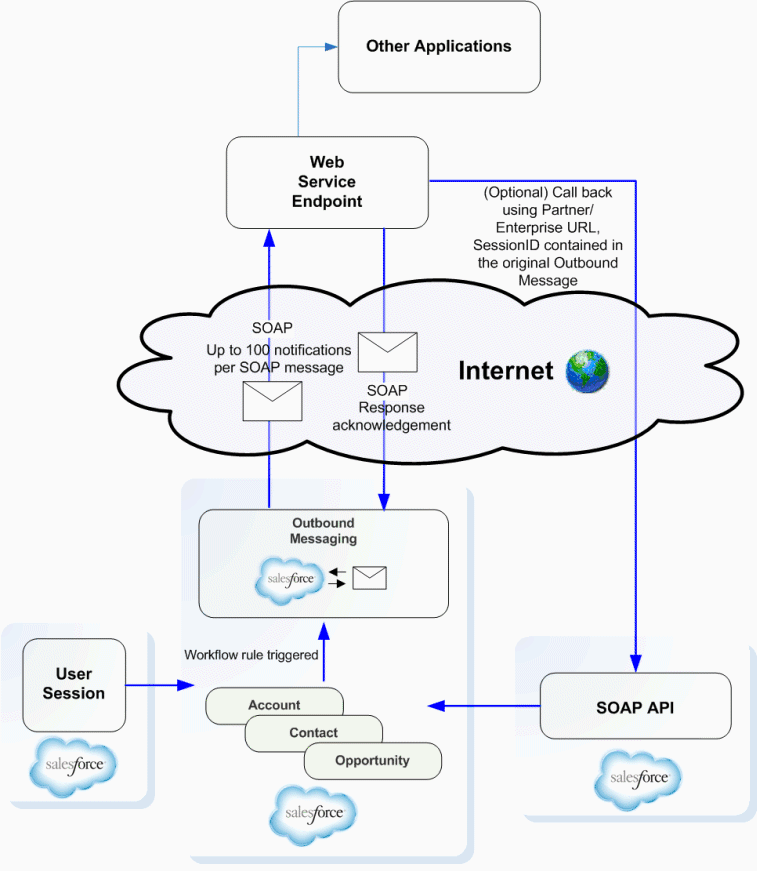
  • Repeatedly send a SOAP notification for up to 24 hours until an acknowledgement is received. 
  • Build integration components without the Use of APEX
  • A single SOAP message can include up to 100 notifications. Each notification contains the object ID and a reference to the associated sObject data.
  • If the information in the object changes after the notification is queued but before it is sent, only the updated information will be delivered.
  • If the endpoint is unavailable, messages will stay in the queue until sent successfully, or until they are 24 hours old. After 24 hours, messages are dropped from the queue.
  • Because a message may be delivered more than once, your listener client should check the notification IDs delivered in the notification before processing.
  • Outbound messaging uses the notifications() call to send SOAP messages over HTTP(S) to a designated endpoint when triggered by a workflow rule.
  • Below diagram will give more clear picture of outbound messaging.
outbound messaging workflow diagram


After you set up outbound messaging, when a triggering event occurs, a message is sent to the specified endpoint URL. The message contains the fields specified when you created the outbound message. Once the endpoint URL receives the message, it can take the information from the message and process it. To do that, you need to examine the outbound messaging WSDL.

Some Important capabilities of Salesforce to Salesforce


  • Automatically publish data from the publisher org. 
  • Manually consume data into the consumer org
  • Publish data from the publisher's Account object to the consumer's Customer__c object
  • System administrators can share all records, but most users can only forward records that they (or their subordinates) own.

  • You can stop sharing a related record from its parent record. Select the parent record. In the related list of the record you want to stop sharing, click Manage Connections in the Sent Connection Name column. Then, select the connection(s) that you want to stop sharing within the Selected Connections list. Click the Remove arrow to move the connection(s) to the Available Connections list. Click Save.
  • To stop sharing a record, view the record and click Stop Sharing in the External Sharing related list. You can only stop sharing records that you or your subordinates own. When you stop sharing the record with a connection, changes to the record in your organization are not reflected on the record in the connection's organization. The shared record is not deleted from the other organization.
  • To stop sharing a case comment or attachment, you must make the records private.
For more considerations and capabilities click here: S2S Considerations

Web-to-Lead limit considerations before we choose it.

In Professional, Enterprise, Unlimited, Performance, and Developer Edition organizations, you can capture up to 500 leads in a 24–hour period. 

If your organization exceeds its daily Web-to-Lead limit, the Default Lead Creator (specified in the Web-to-Lead setup page) receives an email containing the additional lead information. If your company regularly exceeds the Web-to-Lead limit, click Help & Training at the top of any page and select the My Cases tab to submit a request for a higher limit directly to Salesforce.
When your organization reaches the 24–hour limit, Salesforce stores additional requests in a pending request queue that contains both Web-to-Case and Web-to-Lead requests. The requests are submitted when the limit refreshes. The pending request queue has a limit of 50,000 combined requests. If your organization reaches the pending request limit, additional requests are rejected and not queued. Your administrator receives email notifications for the first five rejected submissions. Contact Salesforce Customer Support to change your organization's pending request limit.

Canvas Life Cycle Handler to change url Dynamically and provide authorization information via the signed Request

You can control your app lifecycle by providing an implementation of the Canvas.CanvasLifecycleHandler Apex interface that Salesforce can use.
The Apex Canvas.CanvasLifecycleHandler interface provides methods and callbacks for customizing app lifecycle behavior. Salesforce will use your implementation at runtime to let you run custom code. Use the following steps to create an implementation of the Canvas.CanvasLifecycleHandler interface.

  1. From Setup, enter Apex Classes in the Quick Find box, then select Apex Classes.
  2. Click New to create a Apex class.
  3. Create an Apex class that implements the Canvas.CanvasLifecycleHandler interface. You must implement the excludeContextTypes() and onRender() methods. Here’s a template example:public class


MyCanvasLifecycleHandler implements Canvas.CanvasLifecycleHandler {

    public Set<Canvas.ContextTypeEnum> excludeContextTypes()
{ Set<Canvas.ContextTypeEnum> excluded = new Set<Canvas.ContextTypeEnum>(); // Code goes here to add items to excluded list // that should be excluded from Context data return excluded; }

 public void onRender(Canvas.RenderContext renderContext) { // Code goes here to customize behavior when the app is rendered } }


    >> After you’ve finished adding your code, save the Apex class
    >> Optionally test your implementation by using the Canvas.Test class
   >>  To let Salesforce know which implementation to use for your app, associate your Apex class with your app.

To modify the default behavior of the signed request, you need to provide an Apex class that implements Canvas.CanvasLifecycleHandler.onRender() and associate this class with your canvas app. In your onRender() implementation, you can control app behavior with custom code.
Salesforce calls your implementation of onRender() just before your app is rendered. Current context information is passed to this method in the Canvas.RenderContext parameter.
In your onRender() implementation, you can retrieve the following context information.
  • Application context data, such as the canvas app name, URL, version, and namespace.
  • Environment context data, such as the display location and sublocation, object field names, and custom parameters.
You can set the following context information.
  • The portion of the canvas app URL after the app domain.
  • The list of object fields for which Salesforce will return Record context data if the canvas app appears on an object page. One way a canvas app can appear on an object page is if the canvas app appears on a Visualforce page through the use of the <apex:canvasApp> component and that Visualforce page is associated with an object.
  • The custom parameters that are passed to the canvas app.
You can also use Canvas.CanvasRenderException to present an error message to the user in the Salesforce by throwing a Canvas.CanvasRenderException.
Here’s an example onRender() implementation that:
  • Checks the app version information and, if the version is unsupported, throws a CanvasRenderException.
  • Overrides the current canvas app URL, appending ‘/alternatePath’ to the domain portion of the original URL.
  • Sets the list of object fields to include Name, BillingAddress, and YearStarted, anticipating that the canvas app will appear on the Account page.
  • Overrides the set of custom parameters by adding a new ‘newCustomParam’ parameter. Note that the current set of parameters is first retrieved and cached locally. The new parameter is added to the cached list to ensure that you don’t lose the current set of custom parameters when you call setParametersAsJSON().

  • public void onRender(Canvas.RenderContext renderContext) {

    // Get the Application and Environment context from the RenderContext
    Canvas.ApplicationContext app = renderContext.getApplicationContext();
    Canvas.EnvironmentContext env = renderContext.getEnvironmentContext();

    // Check the application version
    Double currentVersion = Double.valueOf(app.getVersion());
    if (currentVersion <= 5){
        // Versions lower than 5 are no longer supported in this example
        throw new Canvas.CanvasRenderException('Error: Versions earlier than 5 are no longer supported.');
    }

    // Override app URL, replacing portion after domain with '/alternatePath'
    app.setCanvasUrlPath('/alternatePath');

    // Add Name, BillingAddress and YearStarted to fields 
    // (assumes we'll run from a component on the Account detail page)
    Set<String> fields = new Set<String>{'Name','BillingAddress','YearStarted'};
    env.addEntityFields(fields);

    // Add a new custom param to the set of custom params
    // First, get the current custom params
    Map<String, Object> previousParams = 
        (Map<String, Object>) JSON.deserializeUntyped(env.getParametersAsJSON());
    // Add a 'newCustomParam' to our Map
    previousParams.put('newCustomParam','newValue');
    // Now, replace the parameters
    env.setParametersAsJSON(JSON.serialize(previousParams));
}

Friday, May 8, 2020

Generate a Certificate file and Private Key


   Generate a Certificate file and Private Key

An example of how to create a certificate:


1.   keytool -keysize 2048 -genkey -alias mycert -keyalg RSA -keystore ./mycert.jks

2.   keytool -importkeystore -srckeystore mycert.jks -destkeystore mycert.p12 -deststoretype PKCS12

3.  openssl pkcs12 -in mycert.p12 -out key.pem -nocerts –nodes

4.  keytool -export -alias mycert -file mycert.crt -keystore mycert.jks -rfc


If you don't have openssl installed click on below link and download now.


You will get one executable file, click on it and follow the wizard steps until you finish it.


Add openssl to your environment variables.My system path settings are as below. Follow the same in your system as well.

System variable settings:


bin folder path should be given in the environment path variable.


User variable settings.


OPENSSL_CONF=yourpath/openssl.cfg

Once these settings are done, go back to the cmd and type openssl. You should see >OpenSSL as output. If the settings are incorrect, you will get error message.

KeyTool.

Keytool is part of your Jave JDK. go to the path of keytool and run the keytool commands, you don't need to do anything special for keytool.


c


Monday, April 27, 2020

pubsub in LWC

If we remember the Aura framework, to communicate between two unknown components we used the Application event. There is no such event in lwc instead an alternate is pubsub module.

copy the pubsub code from the below link and create a lwc service component with the name lwc.

https://github.com/trailheadapps/lwc-recipes/blob/master/force-app/main/default/lwc/pubsub/pubsub.js


From the above module, keep a special eye on registerListener,fireEvent and unregisterListener functions.

export {
    registerListener,
    unregisterListener,
    unregisterAllListeners,
    fireEvent
};


In the publisher component we use fireEvent and from the subscriber component, we use registerListener and unregisterListener. Both publisher and subscriber share these functions and hence we are calling it as pubsub module.

Below is the simple and easy code to understand this concept.

publishercmp.html

<template>
    <lightning-card  title="I'm a publisher">
        <lightning-layout>
           <lightning-layout-item padding="around-small">
            <lightning-button label="Publisher" onclick={fireevent}></lightning-button>
           </lightning-layout-item>
       </lightning-layout>
      
    </lightning-card>
    
</template>

publishercmp.js

import { LightningElementwire } from 'lwc';
import {fireEventfrom 'c/pubsub';
import { CurrentPageReference } from 'lightning/navigation';

export default class MyPublisher extends LightningElement {

@wire(CurrentPageReferencepageRef;

fireevent(){
 fireEvent(this.pageRef"supplyme","from publisher");
}
}


subscriber.html

<template>
    <lightning-card title="I'm a Subscriber">
        <lightning-layout>
            <lightning-layout-item>
                {datafrompub}
            </lightning-layout-item>
        </lightning-layout>
    </lightning-card>
</template>

subscriber.js

import { LightningElementwire } from 'lwc';
import { CurrentPageReference } from 'lightning/navigation';
import {registerListener,unregisterAllListenersfrom 'c/pubsub';

export default class MySubscriber extends LightningElement {

    @wire(CurrentPageReferencepageRef;
    datafrompub;

    connectedCallback(){ registerListener("details",this.getdata,this);}

    disconnectedCallback(){ unregisterAllListeners(this);}

    getdata(pubdata){

    this.datafrompub=pubdata;

    }

}


Here is the output after clicking the button in the publisher component.


Thanks.


Loadstyle, Loadscript in LWC

Import static resources from the @salesforce/resourceUrl scoped module. Static resources can be archives (such as .zip and .jar files), images, style sheets, JavaScript, and other files.

Below is the sample example for the same:

import { LightningElement } from 'lwc';
import img  from '@salesforce/resourceUrl/benioff';
export default class Singletonex extends LightningElement {

imagebenioff=img;
}
}
<template>
<button onclick={checkfunctions} class="button">custom script from different component </button>
    <div class="slds-m-around_medium">
    <img src={imagebenioff}>
    </div>
</template>


Download any pic which can be archives (such as .zip and .jar files), images, style sheets, JavaScript, and other files. Here I downloaded the Mark Benioff pic to remember the boss of Salesforce :)

Working with an image is straight forward, how about custom CSS and external libraries?

To do this first include the below statement and then include the path of the resource which you want to use.

import {loadStyle,loadScriptfrom 'lightning/platformResourceLoader';

To map this with your existing aura knowledge loadStyle and loadScripts are as similar as below code.

<aura:component>
    <ltng:require
        styles="{!$Resource.jsLibraries  + '/styles/jsMyStyles.css'}"
        scripts="{!$Resource.jsLibraries + '/jsLibOne.js'}"
        afterScriptsLoaded="{!c.scriptsLoaded}" />
</aura:component>
Here loadStyle and loadScript are promises, use promise notations to utilize these resources.

Below is the simple defined example to understand this concept better.

markup:

<template>

    <button onclick={checkfunctions} class="button">custom script from different component </button>
    <div class="slds-m-around_medium">
    <img src={imagebenioff}>
    </div>
</template>

import { LightningElement } from 'lwc';
import img  from '@salesforce/resourceUrl/benioff';
import {loadStyle,loadScriptfrom 'lightning/platformResourceLoader';

import jsurl from '@salesforce/resourceUrl/customjs';
import storageresource from '@salesforce/resourceUrl/storage';
import cssex  from '@salesforce/resourceUrl/customcss';

export default class Singletonex extends LightningElement {

imagebenioff=img;
connectedCallback(){

    Promise.all([loadScript(this,storageresource),loadScript(this,jsurl),
    loadStyle(this,cssex)]).then().catch();

}

checkfunctions(){
    console.log("@@@@@@ Fruits @@@@@@@@@"+_map.getFruits());
    
    console.log("@@@@@@ shared component counter @@@@@@@@@"+counter.increment());
    console.log("@@@@@@ shared component counter@@@@@@@@@"+counter.getValue());


}


}


Below are the resources to include in the static resources.

customcss (ensure that to save it with .css extension)

.button {
  background-color: #4CAF50;
  border: none;
  color: white;
  padding: 15px 32px;
  text-align: center;
  text-decoration: none;
  display: inline-block;
  font-size: 16px;
  margin: 4px 2px;
  cursor: pointer;
}


customjs (ensure that to save it with .js extension)

window._map = (function() {
    var fruits = ["Mango", "Apple", "Banana", "Graps", "Pineapple"];
    return {
        getFruits: function() {
            return fruits;
        }
    };
}());

storagejs (ensure that to save it with .js extension)


window.counter = (function(){

    var value = 0; // private

    return { //public API
       
        increment: function() {
            value = value + 1;
            return value;
        },

        getValue: function() {

            return value;
        }
       
    };

}());

The above storage code acts as a singleton pattern. Results are persistent across multiple components on the same page. If more than one component are using same code on the same page. The state will be carried forward.  Ex: In component 1 when you click the button count will be 1 and when you click the similar button to call the same code in the other component, the count will be carried forward. Now the count will be 2 and so on.....